SOUND MANAGER
Generatore e laboratorio audio
Audio generator and laboratory
SOUND MANAGER è un generatore e laboratorio audio realizzato da IZ4BQV Luigi Mongardi. Riunisce in un'unica applicazione generazione di segnali, sweep, diverse forme d'onda, esperimenti di risonanza, organo, effetti e suoni sintetici, registrazione WAV e altri strumenti per l'esplorazione pratica dei segnali audio.
SOUND MANAGER is an audio generator and laboratory created by IZ4BQV Luigi Mongardi. It brings together signal generation, sweep, several waveforms, resonance experiments, an organ, effects and synthetic sounds, WAV recording and other tools for practical exploration of audio signals.
SOUND MANAGER — Alcune videate / Some screenshots
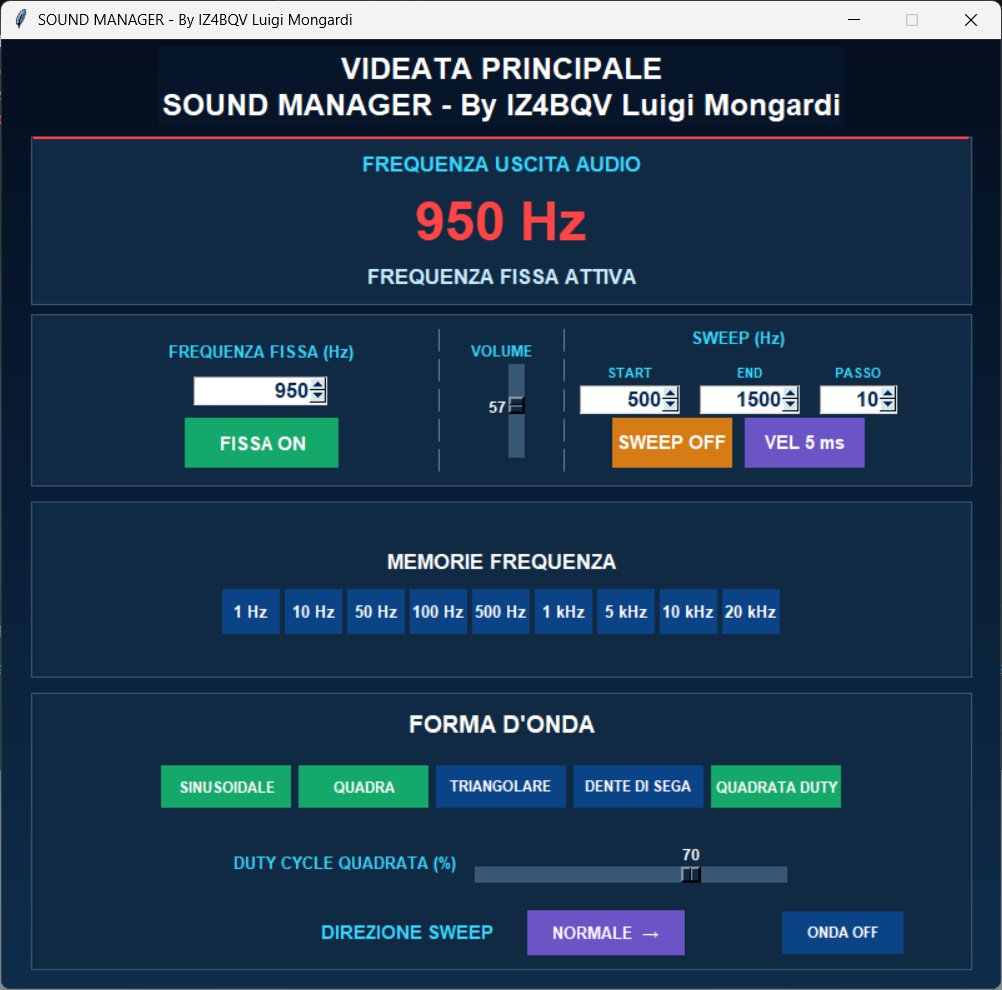
SOUND MANAGER main window 1–20,000 Hz audio generator, fixed frequency, sweep, frequency memories and waveform selection.
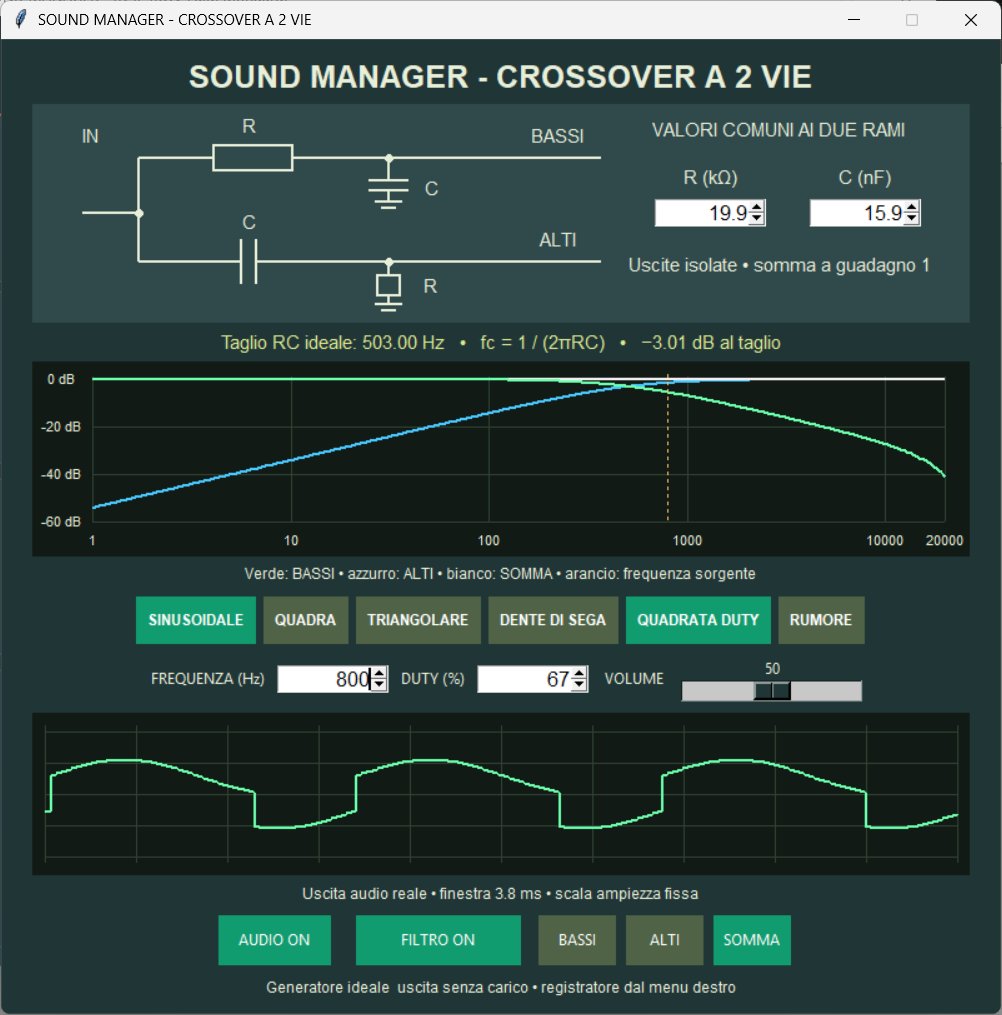
Crossover 2 way filter circuit, frequency response and comparison between ideal and digital filtering.
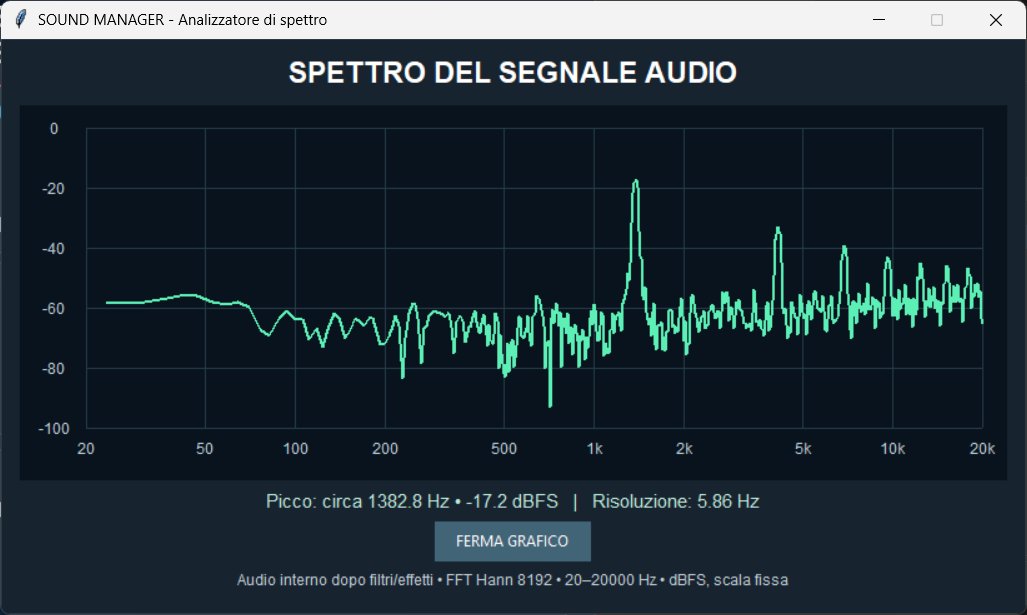
Spectrum analyzer audio spectrum display with peak frequency and dBFS level.
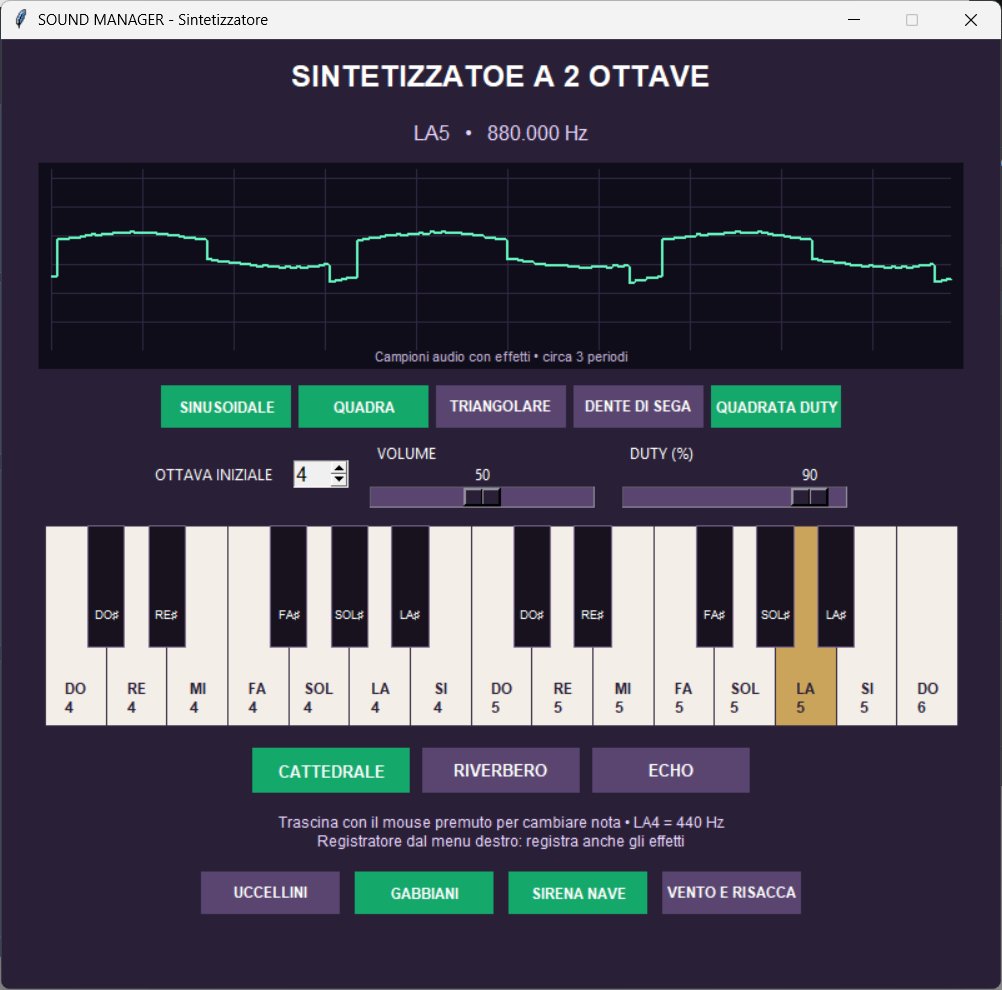
Two-octave synthesizer musical keyboard, combined waveforms, audio effects and synthetic ambient sounds.
1. COMANDI GENERALI E MENU DESTRO
Clic destro sullo sfondo per aprire le sezioni. I toggle accendono/spengono le funzioni; gli spinbox consentono di scrivere valori o usare le frecce. Le sezioni restano aperte con i propri valori. Solo la sezione in primo piano controlla l'audio; quelle dietro sono indicate IN PAUSA. Riportando avanti una sezione, il suono riprende se i suoi comandi erano ON; quelli OFF restano OFF. Nell'organo le note si rilasciano al cambio finestra, mentre i fondi attivati possono riprendere. Chiudere una sezione chiude solo quella finestra. Registratore, oscilloscopio e analizzatore sono finestre indipendenti: possono restare aperti mentre si modificano i comandi della sezione.
1. GENERAL CONTROLS AND RIGHT-CLICK MENU
Right-click the background to open a section. Toggle buttons switch functions on/off; spinboxes accept typing or arrow clicks. Sections remain open with their settings. Only the foreground section controls audio; background sections are marked PAUSED. Returning to a section resumes sound if its controls were ON; OFF controls remain OFF. Organ notes are released when switching windows; enabled backgrounds may resume. Closing a section closes only that window. The recorder, oscilloscope and spectrum analyzer are independent windows and can remain open while you adjust a section.
2. FREQUENZA FISSA E MEMORIE
Gamma 1–20000 Hz. FISSA ON/OFF avvia o arresta il tono. Il valore resta impostato quando si ferma. Un clic su un preset lo seleziona, lo evidenzia e avvia la frequenza; un secondo clic sul preset attivo ferma la fissa. Selezionare un altro preset cambia frequenza.
2. FIXED FREQUENCY AND PRESETS
Range: 1–20000 Hz. FISSA ON/OFF starts or stops the tone, preserving the frequency setting. Clicking a preset highlights it and starts that frequency; clicking the active preset again stops the fixed tone. Another preset changes the frequency.
3. SWEEP
START ed END definiscono gli estremi, con START minore di END. PASSO indica l'incremento in Hz; VEL cambia l'intervallo fra i passi. SWEEP ON/OFF avvia o arresta la scansione; DIREZIONE sceglie salita o discesa. Frequenza fissa e sweep sono alternativi. Impostazioni iniziali: 500–1500 Hz, passo 10 Hz.
3. SWEEP
START and END set the limits; START must be lower than END. PASSO is the frequency step in Hz; VEL changes the interval between steps. SWEEP ON/OFF starts/stops scanning; DIREZIONE selects ascending or descending scans. Fixed tone and sweep are mutually exclusive. Initial settings: 500–1500 Hz in 10 Hz steps.
4. FORME D'ONDA, DUTY E VOLUME
Nella base le cinque forme sono toggle indipendenti: sinusoidale, quadra, triangolare, dente di sega e quadrata duty. Più onde attive vengono miscelate e normalizzate; tutte OFF producono silenzio. Il duty regola la frazione positiva del periodo della sola QUADRATA DUTY. Volume lineare 0–100, inizialmente 50, comune alla fissa e allo sweep. MOSTRA ONDA apre/chiude lo scope dei campioni generati.
4. WAVEFORMS, DUTY AND VOLUME
The main window offers independent sine, square, triangle, sawtooth and variable-duty square toggles. Enabled waves are mixed and normalized; all OFF means silence. DUTY changes the positive portion of the period of QUADRATA DUTY only. Linear volume 0–100, initially 50, is shared by fixed tone and sweep. MOSTRA ONDA opens/closes the generated-sample scope.
5. RISONANZA ONDA SINUSOIDALE
Due sinusoidi a 1 kHz si sommano. Sfasamento 0–100% corrisponde a 0–180°: dalla somma in fase alla cancellazione. AUDIO ON/OFF e volume sono propri della sezione. Il grafico mostra le due componenti e la somma su scala fissa. È un esperimento di somma e fase, non una misura di risonanza di un oggetto fisico.
5. SINE-WAVE RESONANCE
Two 1 kHz sine waves are summed. Phase 0–100% represents 0–180 degrees, from in-phase addition to cancellation. AUDIO ON/OFF and volume belong to this section. The graph displays both components and their sum on a fixed scale. This demonstrates addition and phase, not a physical object's resonance measurement.
6. RISONANZE ONDE DIVERSE
Una sinusoide a 1 kHz resta presente; i toggle aggiungono quadra, triangolare, dente di sega e quadrata duty. Tutti OFF lascia la sola sinusoide. Lo sfasamento delle onde aggiunte va da 0 a 100% (0–360°). Il duty riguarda la quadrata duty. Il margine di livello fisso evita che il riferimento cambi volume quando si aggiungono onde. Le tracce distinguono riferimento, aggiunte e somma.
6. MIXED-WAVE RESONANCE
A fixed 1 kHz sine remains present. Toggles add square, triangle, sawtooth and variable-duty square waves. All added waves OFF leaves the reference sine. The added waves share phase adjustment 0–100% (0–360 degrees). DUTY affects the variable-duty square. Fixed headroom keeps the reference level unchanged as waves are added. Traces distinguish reference, additions and sum.
7. ORGANO
Due ottave e DO finale, ottava iniziale regolabile da 1 a 6; accordatura temperata con LA4=440 Hz. Premi un tasto col mouse e tienilo premuto; trascina per cambiare nota. Al rilascio termina la nota, con eventuali code degli effetti. Le forme d'onda sono miscelabili, il duty regola la quadrata duty. CATTEDRALE, RIVERBERO ed ECHO sono combinabili.
UCCELLINI, GABBIANI, SIRENA NAVE e VENTO E RISACCA sono fondi sintetici indipendenti dalla tastiera: possono suonare anche senza nota e seguono il volume dell'organo. Passano negli effetti, nello scope e nel registratore. Spegnere le forme d'onda non spegne i fondi; il cambio sezione e ASCOLTA li arrestano.
7. ORGAN
Two octaves plus the final C; starting octave 1–6. Equal temperament, A4=440 Hz. Hold a key with the mouse or drag to change notes. Releasing stops the note while effect tails can continue. Waveforms can be mixed; DUTY controls the variable-duty square. CATTEDRALE, RIVERBERO and ECHO can be combined.
UCCELLINI (birds), GABBIANI (gulls), SIRENA NAVE (ship horn) and VENTO E RISACCA (wind and surf) are synthesized backgrounds independent of the keyboard. They follow organ volume and pass through effects, scope and recording. Turning waveforms off does not stop these backgrounds. Switching sections or selecting ASCOLTA stops them.
8. FILTRI — COMANDI COMUNI
Schema con spinbox vicini ai componenti: R in kΩ, C in nF, L in mH. Le cinque onde e RUMORE sono miscelabili; tutte OFF danno silenzio. Frequenza, duty e volume controllano la sorgente. AUDIO ON/OFF controlla l'uscita; FILTRO OFF consente il confronto col segnale originale.
Il grafico superiore mostra la risposta digitale verde e il circuito ideale tratteggiato, su scala fissa in dB; la linea arancio indica la frequenza della sorgente. Lo scope inferiore mostra il segnale audio effettivamente generato.
8. FILTERS — SHARED CONTROLS
The circuit diagram has spinboxes next to components: R in kilohms, C in nanofarads, L in millihenries. Five waveforms and RUMORE (noise) can be mixed; all OFF means silence. Frequency, duty and volume control the source. AUDIO ON/OFF controls output; FILTRO OFF bypasses the filter for comparison.
The upper plot shows digital response in green and ideal circuit response as a dashed line, using a fixed dB scale. Orange marks source frequency. The lower scope displays the actual generated audio samples.
9. PASSA BASSO RC / PASSA ALTO RC
Filtri di primo ordine. Il passa basso attenua le alte frequenze; il passa alto attenua le basse. Taglio ideale fc=1/(2πRC). Cambiare R o C aggiorna risposta e suono. Al taglio ideale l'attenuazione è circa 3 dB.
9. RC LOW-PASS / HIGH-PASS
First-order filters: low-pass attenuates high frequencies; high-pass attenuates low frequencies. Ideal cutoff fc=1/(2πRC). Adjusting R or C updates the plot and sound. Ideal attenuation at cutoff is approximately 3 dB.
10. PASSA BANDA RC
Passa alto R1/C1 seguito da passa basso R2/C2, separati da buffer ideale a guadagno 1. Il buffer impedisce che il secondo stadio carichi il primo. Il programma indica tagli dei singoli stadi, frequenza del picco e guadagno complessivo ideale. I tagli dei singoli stadi non coincidono necessariamente con i limiti a −3 dB dell'intero filtro. Valori iniziali circa 500 e 2000 Hz.
10. RC BAND-PASS
High-pass R1/C1 followed by low-pass R2/C2, separated by an ideal unity-gain buffer so the second stage does not load the first. Displays individual stage cutoffs, ideal peak frequency and overall gain. Individual stage cutoffs are not necessarily the overall filter's −3 dB edges. Initial stage cutoffs are about 500 and 2000 Hz.
11. ELIMINA BANDA RLC
R in serie e ramo LC serie verso massa creano una tacca. L e C spostano la frequenza eliminata; aumentando R la banda eliminata si allarga. Sono indicati frequenza ideale e digitale della tacca, banda ideale a −3 dB e Q. La simulazione usa componenti ideali.
11. RLC BAND-STOP / NOTCH
A series R and a series LC branch to ground create a notch. L and C determine the rejected frequency; increasing R widens the rejected band. Displays ideal and digital notch frequency, ideal −3 dB bandwidth and Q. Components are ideal.
12. CROSSOVER RC A DUE VIE
Due rami di primo ordine con R/C comuni e uscite isolate. BASSI, ALTI e SOMMA selezionano cosa ascoltare sull'uscita mono. Verde=bassi, azzurro=alti, bianco=somma. Sommando i segnali, comprese le loro fasi, si ricostruisce l'originale. Non sono due uscite fisiche separate per altoparlanti.
12. TWO-WAY RC CROSSOVER
Two first-order branches share R/C values and have isolated outputs. BASSI, ALTI and SOMMA select low, high or summed audio on the mono output. Green=low, blue=high, white=sum. Adding the signals, including phase, reconstructs the original. These are not separate physical loudspeaker outputs.
13. DUE TONI INDIPENDENTI
Ogni tono ha frequenza, volume, forma d'onda, duty e ON/OFF propri. Una forma selezionata per tono; la somma è mono. Le frequenze iniziali 440 e 442 Hz permettono battimenti a 2 Hz. FERMA ENTRAMBI arresta i due generatori; lo scope mostra la somma.
13. TWO INDEPENDENT TONES
Each tone has its own frequency, volume, waveform, duty and ON/OFF. One waveform is selected per tone; the two signals are summed to mono. Initial frequencies 440 and 442 Hz demonstrate 2 Hz beats. FERMA ENTRAMBI stops both generators. The scope shows their sum.
14. DISEGNA SUONO
Ogni forma ha un colore e un toggle. Accendi le curve desiderate e AUDIO; clicca vicino a una curva, poi trascina tenendo premuto il tasto sinistro. La selezionata appare più spessa. In un incrocio viene preferita quella già selezionata. Si modifica un periodo che si ripete alla frequenza impostata, non l'inviluppo nel tempo. Più curve attive vengono miscelate e normalizzate.
RIPRISTINA CURVA recupera la forma originale selezionata. ANNULLA MODIFICA recupera fino a 30 interventi di disegno/ripristino. Cambiare DUTY rigenera solo QUADRATA DUTY, sostituendo il suo disegno manuale. Tutte OFF danno silenzio. Non è previsto il salvataggio delle configurazioni; puoi registrare il suono risultante.
14. DRAW SOUND
Each waveform has a color and a toggle. Enable the desired curves and AUDIO, click near a curve, then drag with the left mouse button held. The selected curve is thicker; at a crossing the already selected curve is preferred. You edit a single period repeated at the chosen frequency, not a time envelope. Active curves are mixed and normalized.
RIPRISTINA CURVA restores the selected original waveform. ANNULLA MODIFICA undoes up to 30 drawing/restore operations. Changing DUTY regenerates QUADRATA DUTY only, replacing its hand-drawn shape. All OFF means silence. Configurations are not saved; the resulting audio can be recorded.
15. REGISTRATORE
Durata da 1 a 60 secondi, inizialmente 10. REGISTRA cattura il segnale interno, incluse modifiche live, filtri ed effetti. FERMA conclude prima del tempo scelto. ASCOLTA spegne il generatore e riproduce quanto registrato; FERMA arresta anche la riproduzione. Al termine il generatore resta OFF.
SALVA WAV conserva audio PCM mono a 16 bit. Chiudere la finestra conserva i campioni in memoria fino all'uscita dal programma. Una nuova registrazione chiede conferma se sostituisce dati non salvati. Cambiare sezione interrompe la registrazione in corso. Non vengono registrati microfono o programmi esterni.
15. RECORDER
Duration: 1–60 seconds, initially 10. REGISTRA captures internal audio including live edits, filters and effects. FERMA stops early. ASCOLTA stops the generator and plays the captured sound; FERMA also stops playback. The generator stays OFF afterwards.
SALVA WAV saves mono 16-bit PCM. Closing the recorder retains samples in memory until the application exits. Starting a new recording asks before replacing unsaved data. Switching sections stops an ongoing recording. Microphone input and external applications are not captured.
16. OSCILLOSCOPIO
L'oscilloscopio visualizza in tempo reale la forma d'onda prodotta dalla finestra audio attiva. Il display, ispirato allo stile del classico Tektronix 465, permette di osservare l'andamento del segnale e le variazioni determinate dalla frequenza, dall'ampiezza, dalla forma d'onda, dai filtri e dagli effetti selezionati.
TIME/DIV modifica la base dei tempi, allargando o restringendo orizzontalmente la traccia. VOLTS/DIV regola la scala verticale; POS Y sposta la traccia verso l'alto o verso il basso. Il trigger può essere impostato su AUTO, per stabilizzare automaticamente la visualizzazione, oppure su OFF. RUN/PAUSA ferma temporaneamente l'immagine o ne riprende l'aggiornamento; RESET ripristina le regolazioni iniziali.
DISPLAY ON/OFF spegne o riaccende solamente il display, lasciando aperta la finestra. La normale croce X chiude completamente l'oscilloscopio, che può essere riaperto selezionando OSCILLOSCOPIO nel menu principale. Lo strumento mostra i campioni audio interni e non misura direttamente l'uscita fisica della scheda audio.
16. OSCILLOSCOPE
The oscilloscope displays in real time the waveform generated by the currently active audio window. Its display, inspired by the classic Tektronix 465 style, makes it possible to observe the signal and the changes produced by frequency, amplitude, waveform, filters and selected effects.
TIME/DIV adjusts the time base, expanding or compressing the trace horizontally. VOLTS/DIV changes the vertical scale; POS Y moves the trace up or down. The trigger can be set to AUTO, which automatically stabilizes the display, or to OFF. RUN/PAUSA temporarily freezes the image or resumes its update; RESET restores the initial settings.
DISPLAY ON/OFF switches only the display off or on while leaving the window open. The standard X button closes the oscilloscope completely; it can be reopened by selecting OSCILLOSCOPE from the main menu. The instrument displays internal audio samples and does not directly measure the physical sound-card output.
17. ANALIZZATORE DI SPETTRO
Finestra comune alle sezioni interne e al riascolto delle registrazioni. Mostra i campioni dopo filtri ed effetti: asse logaritmico 20–20000 Hz, livelli di picco in dBFS su scala fissa 0/−100. FFT di 8192 campioni con finestra Hann; risoluzione circa 5.38 Hz a 44.1 kHz o 5.86 Hz a 48 kHz. Il picco indicato è approssimato ai bin: toni molto vicini possono non essere separabili. Il valore non è una misura calibrata di pressione sonora e il livello dei toni tra due bin può apparire più basso.
Muovi il mouse sul grafico per leggere la frequenza. DISPLAY ON/OFF spegne o riaccende solamente il display mentre il suono continua. La normale croce X chiude completamente la finestra, che può essere riaperta selezionando ANALIZZATORE DI SPETTRO nel menu principale. L'analizzatore non cattura Soundgen né l'ingresso fisico della scheda.
17. SPECTRUM ANALYZER
Available across internal sections and recorded-audio playback. Analyzes samples after filters/effects: logarithmic 20–20000 Hz axis and fixed 0 to −100 dBFS peak-amplitude scale. Uses an 8192-sample Hann-window FFT: resolution about 5.38 Hz at 44.1 kHz or 5.86 Hz at 48 kHz. The displayed peak is a bin estimate; nearby tones may not be resolved. This is not a calibrated sound-pressure measurement, and tones between bins may appear lower in level.
Move the mouse over the plot to read frequency. DISPLAY ON/OFF switches only the display off or on while audio continues. The standard X button closes the window completely; it can be reopened by selecting SPECTRUM ANALYZER from the main menu. Soundgen and physical sound-card inputs are not analyzed.
18. CASCATA / WATERFALL
La voce CASCATA / WATERFALL nel menu destro avvia spectrum.exe dalla stessa cartella di SOUND MANAGER. Se il file manca, appare un messaggio. Una seconda copia non viene avviata mentre quella aperta dal menu è ancora in esecuzione.
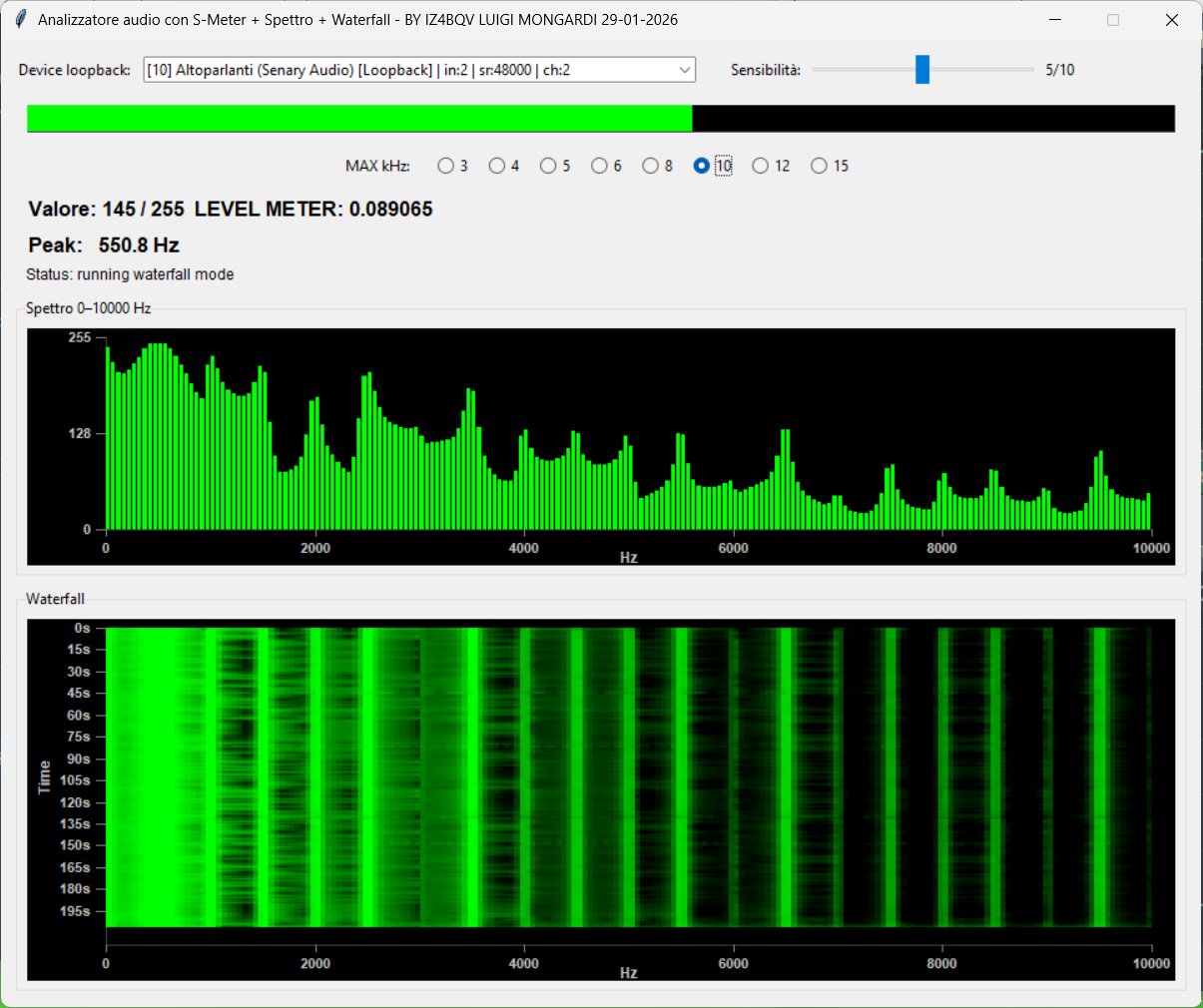
È un programma esterno con acquisizione audio indipendente, spettro e grafico a cascata. Seleziona il dispositivo audio disponibile nella sua finestra. Può restare aperto mentre usi SOUND MANAGER e si chiude separatamente: CHIUDI TUTTO chiude le finestre interne, ma non spectrum.exe. Per visualizzare l'audio riprodotto dal computer occorre un dispositivo di acquisizione loopback adatto.
18. WATERFALL
The CASCATA / WATERFALL right-click menu item launches spectrum.exe from the SOUND MANAGER folder. A missing file produces a message. Another copy is not launched while the menu-launched process is still running.
This external program has its own audio input, spectrum and scrolling waterfall display. Select an available audio device in its window. It can remain open alongside SOUND MANAGER and closes separately: CLOSE ALL closes internal windows but does not close spectrum.exe. Capturing computer playback requires a suitable loopback input device.
19. SUONI SPAZIALI — SOUNDGEN
Avvia soundgen.exe dalla cartella dello script Python o dell'eseguibile SOUND MANAGER. Se manca compare un errore. Il suono interno si ferma; Soundgen gestisce autonomamente il proprio audio e il salvataggio. Non viene avviata una seconda copia se il processo già lanciato risulta ancora attivo.
19. SPATIAL SOUNDS — SOUNDGEN
SUONI SPAZIALI launches soundgen.exe from the Python script or SOUND MANAGER executable folder. A missing file produces an error. Internal sound stops; Soundgen independently handles its audio and saving. A second instance is not launched while the tracked process is still running.
20. CHIUDI TUTTO
Chiude le finestre interne e ferma l'audio. Per una registrazione non salvata viene richiesta conferma. Se Soundgen avviato dal menu è ancora aperto, SÌ gli invia la normale richiesta di chiusura, NO lo lascia aperto, ANNULLA lascia aperto SOUND MANAGER. Eventuali conferme di salvataggio di Soundgen vanno gestite nella sua finestra: non viene terminato forzatamente.
20. CLOSE ALL
CHIUDI TUTTO stops audio and closes internal windows. Unsaved recordings require confirmation. If the Soundgen process launched from the menu is still open, SÌ requests normal closure, NO leaves Soundgen open, and ANNULLA keeps SOUND MANAGER open. Any Soundgen save prompts must be handled in its own window; its process is not forcibly terminated.
21. LIMITI DELLA SIMULAZIONE
Schemi ideali, sorgente ideale e uscita senza carico. Alle frequenze alte il filtro digitale può differire dal circuito analogico; le forme ricche di armoniche possono presentare aliasing. Gli scope mostrano campioni interni, non una misura dell'uscita fisica. La risposta effettiva dipende anche da scheda audio e altoparlanti. Parti con volume moderato.
Buon divertimento da IZ4BQV Luigi Mongardi 25/09/2026.
21. SIMULATION LIMITS
Ideal components, ideal source and unloaded output. Digital filters may differ from analog circuits at high frequencies; harmonic-rich waveforms may exhibit aliasing. Scopes show internal samples rather than measured physical output. Actual reproduction also depends on the sound card and speakers. Start at moderate volume.
Enjoy SOUND MANAGER — IZ4BQV Luigi Mongardi.
Download
Scarica il programma SOUND MANAGER Aggiornato 29-09-2026
Password di estrazione: IZ4BQV (MAIUSCOLO)
Extraction password: IZ4BQV (UPPERCASE)
Nota
La gamma impostabile non garantisce la risposta della scheda audio e degli altoparlanti a tutte le frequenze. Iniziare le prove a volume basso.
Note
The selectable frequency range does not guarantee the response of the sound card and speakers at every frequency. Begin testing at low volume.
SOUND MANAGER — IZ4BQV Luigi Mongardi — 2026
Pagina in allestimento / Page under construction
